Usage
See the usage below for the command line options available for each subcommand.
Graph
Creates a knowledge graph of Stony Brook’s course catalog via an input knowledge base (as a URL). The URL, if not specified, defaults to the Stony Brook University course catalog, located here.
Warning
This command takes a while to run, as it scrapes the course catalog for all of the offered courses for the specified major.
usage: schedule.py graph [-h] [-o <FILE>] [-v] [-c] [-e] [-m <MAJOR>] [-u <URL>] [-w <WAIT_TIME>]
                        [--open-browser]
                        {graph,convert,query} ...

positional arguments:
{graph,convert,query}                             Type the 'subcommand' name followed by '-h' or '
                                                    --help' for more information.
    graph                                           Creates knowledge graph of Stony Brook's course
                                                    catalogue via an input knowledge base (as a
                                                    URL).
    convert                                         Convert knowledge graph JSON to logic file
                                                    knowledge graph/base.
    query                                           Executes queries provided a knowledge
                                                    base/graph.

options:
-h, --help                                        show this help message and exit
-o <FILE>, --output <FILE>, --output-file <FILE>  OPTIONAL: Output filename for the JSON/logic
                                                    file. If not specified, then a new file with the
                                                    major in the filename is created in the
                                                    package's resource directory.
-v, --verbose                                     OPTIONAL: Print output to screen.
-c, --clingo                                      OPTIONAL: Convert JSON file to Clingo logic
                                                    file. NOTE: Both or at least one of '--clingo'
                                                    or '--ergo' must be specified for JSON
                                                    conversion. Use Clingo to execute the query.
                                                    NOTE: At least one of '--clingo' or '--ergo'
                                                    must be specified for query execution.
-e, --ergo, --ergoai                              OPTIONAL: Convert JSON file to ErgoAI logic
                                                    file. NOTE: Both or at least one of '--clingo'
                                                    or '--ergo' must be specified for JSON
                                                    conversion. WARNING: Ergo conversion can only be
                                                    done once per python session. NOTE: At least one
                                                    of '--clingo' or '--ergo' must be specified for
                                                    query execution. DANGER: ErgoAI query execution
                                                    is not fully supported.
-m <MAJOR>, --major <MAJOR>                       REQUIRED: SBU major three letter code (e.g.
                                                    'CSE' for computer science).
-u <URL>, --url <URL>                             OPTIONAL: Stony brook Univiersity (SBU) course
                                                    catalogue (knowledge base) URL. If not provided,
                                                    then the default URL is used.
-w <WAIT_TIME>, --wait-time <WAIT_TIME>           OPTIONAL: Maximum wait time (in seconds) for
                                                    each click operation. Defaults to 10.
--open-browser                                    OPTIONAL: Open browser during course catalog
                                                    scraping.
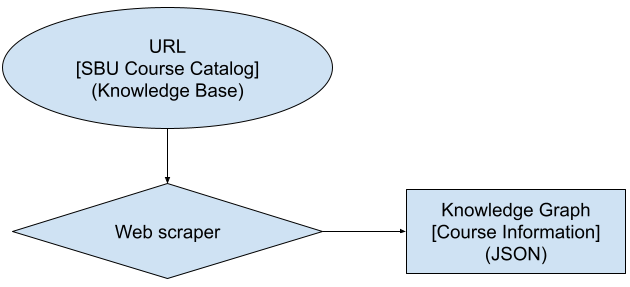
The following flow chart shows the process constructing a knowledge graph from the knowledge base (course catalog):
Convert
The convert subcommand converts a JSON file to a logic file. The logic file can be in Clingo or ErgoAI format.
The JSON file is generated by the graph subcommand. The logic file is used to execute queries in the query subcommand.
usage: schedule.py convert [-h] [-o <FILE>] [-v] [-c] [-e] [-j <FILE>] {graph,convert,query} ...

positional arguments:
{graph,convert,query}                             Type the 'subcommand' name followed by '-h' or '
                                                    --help' for more information.
    graph                                           Creates knowledge graph of Stony Brook's course
                                                    catalogue via an input knowledge base (as a
                                                    URL).
    convert                                         Convert knowledge graph JSON to logic file
                                                    knowledge graph/base.
    query                                           Executes queries provided a knowledge
                                                    base/graph.

options:
-h, --help                                        show this help message and exit
-o <FILE>, --output <FILE>, --output-file <FILE>  OPTIONAL: Output filename for the JSON/logic
                                                    file. If not specified, then a new file with the
                                                    major in the filename is created in the
                                                    package's resource directory.
-v, --verbose                                     OPTIONAL: Print output to screen.
-c, --clingo                                      OPTIONAL: Convert JSON file to Clingo logic
                                                    file. NOTE: Both or at least one of '--clingo'
                                                    or '--ergo' must be specified for JSON
                                                    conversion. Use Clingo to execute the query.
                                                    NOTE: At least one of '--clingo' or '--ergo'
                                                    must be specified for query execution.
-e, --ergo, --ergoai                              OPTIONAL: Convert JSON file to ErgoAI logic
                                                    file. NOTE: Both or at least one of '--clingo'
                                                    or '--ergo' must be specified for JSON
                                                    conversion. WARNING: Ergo conversion can only be
                                                    done once per python session. NOTE: At least one
                                                    of '--clingo' or '--ergo' must be specified for
                                                    query execution. DANGER: ErgoAI query execution
                                                    is not fully supported.
-j <FILE>, --json <FILE>, --json-file <FILE>      REQUIRED: Input JSON file containing course
                                                    information.
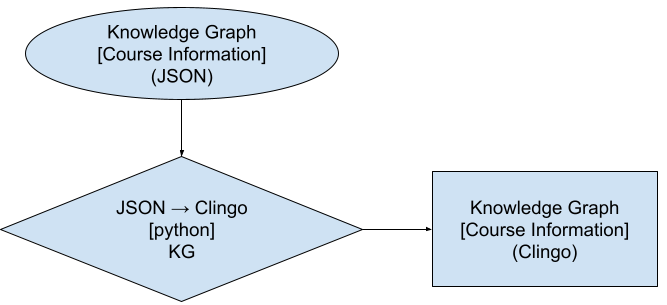
The following flow chart shows the process of converting a JSON file to a Clingo logic file:
Query
The query subcommand is used to execute queries provided a knowledge base/graph in either Clingo or ErgoAI.
Warning
If the query is not satisfiable, then a
ClingoSatistfiablityErroris raised.
usage: schedule.py query [-h] [-o <FILE>] [-v] [-c] [-e] [-k <FILE>] [-n <MODEL>] [-t <THREADS>]
                        [--config <STR>] [-q <FILE | STR> [<FILE | STR> ...]]
                        {graph,convert,query} ...

positional arguments:
{graph,convert,query}                                Type the 'subcommand' name followed by '-h'
                                                    or '--help' for more information.
    graph                                              Creates knowledge graph of Stony Brook's
                                                    course catalogue via an input knowledge base
                                                    (as a URL).
    convert                                            Convert knowledge graph JSON to logic file
                                                    knowledge graph/base.
    query                                              Executes queries provided a knowledge
                                                    base/graph.

options:
-h, --help                                           show this help message and exit
-o <FILE>, --output <FILE>, --output-file <FILE>     OPTIONAL: Output filename for the JSON/logic
                                                    file. If not specified, then a new file with
                                                    the major in the filename is created in the
                                                    package's resource directory.
-v, --verbose                                        OPTIONAL: Print output to screen.
-c, --clingo                                         OPTIONAL: Convert JSON file to Clingo logic
                                                    file. NOTE: Both or at least one of '--
                                                    clingo' or '--ergo' must be specified for
                                                    JSON conversion. Use Clingo to execute the
                                                    query. NOTE: At least one of '--clingo' or '
                                                    --ergo' must be specified for query
                                                    execution.
-e, --ergo, --ergoai                                 OPTIONAL: Convert JSON file to ErgoAI logic
                                                    file. NOTE: Both or at least one of '--
                                                    clingo' or '--ergo' must be specified for
                                                    JSON conversion. WARNING: Ergo conversion can
                                                    only be done once per python session. NOTE:
                                                    At least one of '--clingo' or '--ergo' must
                                                    be specified for query execution. DANGER:
                                                    ErgoAI query execution is not fully
                                                    supported.
-k <FILE>, --knowledge <FILE>                        OPTIONAL: Input knowledge base/graph file to
                                                    be queried. NOTE: If using Clingo, the query
                                                    can be in the knowlege base file.
-n <MODEL>, --num-models <MODEL>                     OPTIONAL: Number of models to generate for
                                                    Clingo queries. Defaults to None.
-t <THREADS>, --num-threads <THREADS>                OPTIONAL: Maxiumum number of threads to use
                                                    while executing Clingo queries. Defaults to
                                                    None.
--config <STR>                                       OPTIONAL: Configuration for Clingo queries.
                                                    Options are 'handy' or 'competition'. Further
                                                    explanations of these options can be obtained
                                                    by typing: 'clingo --help=3' Defaults to
                                                    'handy'.
-q <FILE | STR> [<FILE | STR> ...], --query <FILE | STR> [<FILE | STR> ...]
                                                    OPTIONAL: Query or query file paths to be
                                                    passed to Clingo or ErgoAI. Clingo can take
                                                    multiple input files. ErgoAI can only take
                                                    string inputs. NOTE: Can be specified
                                                    multiple times.
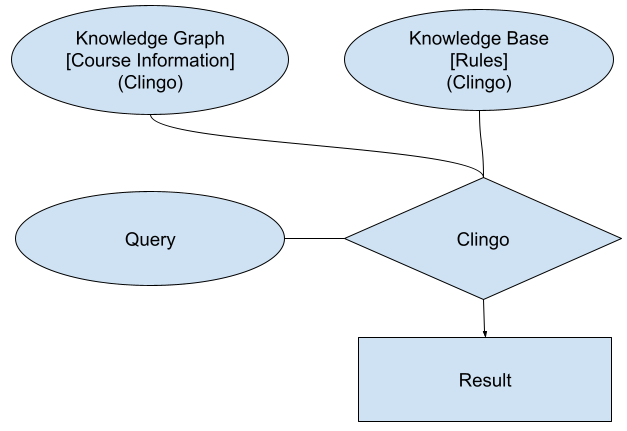
The following flow chart shows the process of querying a knowledge base provided a knowledge graph and a query: